
Return to old menu
Free, 24/7 8 (800) 775-97-42
Country flag EN
Country flag RU
Country flag DE
₽ RUB
$ USD
€ EUR
Choose VPS
Bare Metal
Marketplace
About us
Community
Support
Balance:
Bonuses:
Log in
Log out
Register
FEATURED PLANS
Ref icon
VPS Start From 149 rubles/month
Ref icon
VPS Powerful Powerful servers at an attractive price
Ref icon
VPS Windows Convenient configurations for working with Windows OS
Ref icon
VPS Fast NVMe Maximum speed with industrial NVMe drives
Ref icon
VPS Plesk Set up your server in a few clicks
Ref icon
VPS with 1C for accountants Servers optimized for 1C
Ref icon
VPS for trading Install trading terminals in one click
Ref icon
VPS for gamers Powerful hardware for demanding raids
Ref icon
VPS for business Configure any server parameter
Ref icon
See all plans
Card icon Custom configuration
A convenient configurator will allow you to configure any server parameter, and we will offer the best price for it.
Configure
Card icon Free test for 3 days
For new users only. Take any server up to 3000 rubles for a test, check applications and programs by installing them on a VPS.
Try it
ACCOUNT My servers Domains Order Settings Partner
DEDICATED SERVERS
Ref icon
Bare Metal Start From 19845 ₽/month
Ref icon
Bare Metal Standard Universal servers
Ref icon
Bare Metal Powerful For resource-intensive tasks
Ref icon
Bare Metal AMD EPYC Servers based on AMD EPYC
Ref icon
Bare Metal GPU For machine learning
Ref icon
All configurations
Card icon Choose your server
Find the right CPU, RAM size, drives and other parameters - get the optimal price.
Order
Card icon Quick start
The dedicated server will be available for SSH connection within 10 minutes. To try it out, daily rental from 661.5 ₽/day is available.
Learn more
ACCOUNT My servers Domains Order Settings Partner
FOR CLIENTS
About company We are in the top 20 in Russia IAAS
Data centers 22 Tier III data centers in 9 countries
FSTEC certification We will help with state licensing
Bonus program Cumulative loyalty system
Card icon Ping to data centers
Measure ping from you to all of our data centers. We will find the one that suits you perfectly.
Measure
Card icon Free test for 3 days
For new users only. Take any server up to 3000 rubles for a test, check applications and programs by installing them on a VPS.
Try it
ACCOUNT My servers Domains Order Settings Partner
FOR CLIENTS
Help center Step-by-step instructions on how to set up a VPS
FAQ Frequently asked questions about VPS setup and the service
News and events Service news, information about events and special projects of the company
Card icon Social networks
Our blog on Habr, talks, company news.
Join
Card icon Free test for 3 days
For new users only. Take any server up to 3000 rubles for a test, check applications and programs by installing them on a VPS.
Try it
ACCOUNT My servers Domains Order Settings Partner
Free, 24/7 8 (800) 775-97-42
Mobile menu button
Choose VPS
Mobile card icon
Custom configuration A convenient configurator will allow you to configure any server parameter, and we will offer the best price for it.
Configure
Ref icon
VPS Start From 149 rubles/month
Ref icon
VPS Powerful Powerful servers at an attractive price
Ref icon
VPS Windows Convenient configurations for working with Windows OS
Ref icon
VPS Fast NVMe Maximum speed with industrial NVMe drives
Ref icon
VPS Plesk Set up your server in a few clicks
Ref icon
VPS with 1C for accountants Servers optimized for 1C
Ref icon
VPS for trading Install trading terminals in one click
Ref icon
VPS for gamers Powerful hardware for demanding raids
Ref icon
VPS for business Configure any server parameter
Ref icon
See all plans
Ref icon
Free test for 3 days
Bare Metal
Mobile card icon
Choose your server Find the right CPU, RAM size, drives and other parameters - get the optimal price.
Order
Ref icon
Bare Metal Start From 19845 ₽/month
Ref icon
Bare Metal Standard Universal servers
Ref icon
Bare Metal Powerful For resource-intensive tasks
Ref icon
Bare Metal AMD EPYC Servers based on AMD EPYC
Ref icon
Bare Metal GPU For machine learning
Ref icon
All configurations
Marketplace
About us
Mobile card icon
Ping to data centers Measure ping from you to all of our data centers. We will find the one that suits you perfectly.
Measure
About company We are in the top 20 in Russia IAAS
Data centers 22 Tier III data centers in 9 countries
FSTEC certification We will help with state licensing
Bonus program Cumulative loyalty system
Community
Mobile card icon
Social networks Our blog on Habr, talks, company news.
Join
Help center Step-by-step instructions on how to set up a VPS
FAQ Frequently asked questions about VPS setup and the service
News and events Service news, information about events and special projects of the company
Support
Country flag EN
Country flag RU
Country flag DE
₽ RUB
$ USD
€ EUR
Log in
Register
Personal account
My servers
Domains
Balance: Bonuses:
Order
Settings
Partner
Log out
My servers
Bare Metal
Services
Certificates
Domains
Order
Settings
Partner
  • ВЫБРАТЬ VPS
  • ДАТА-ЦЕНТРЫ
  • СПРАВОЧНИК
  • ПОДДЕРЖКА
  • ВОЙТИ
RuVDS/Справочник/Настройка VPS Сервера/Как получить и скопировать список установленных пакетов на Ubuntu / Debian Linux сервере

Как получить и скопировать список установленных пакетов на Ubuntu / Debian Linux сервере

82391 просмотров 45 2020-11-11 2021-11-10

Мощные VPS на SSD за 1099 руб. в месяц.

Приобретая новый виртуальный сервер у RUVDS на Ubuntu / Debian вы можете получить список всех установленных пакетов на вашем виртуальном сервере. Также в данной статье мы рассмотрим, как скопировать и перенести установленные пакеты с одного виртуального сервера на другой.

Чтобы получить список всех установленных пакетов на Ubuntu или Debian, используйте DPKG и другие команды.

Введите следующую команду:

dpkg-query -l

Примеры результатов:
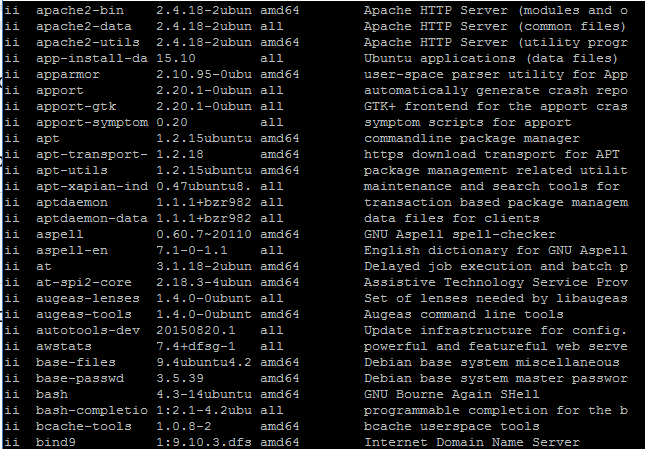
Результаты команды dpkg-query -l

Чтобы увидеть только список пакетов, попробуйте:

dpkg-query -f '${binary:Package}\n' -W

Примеры результатов:
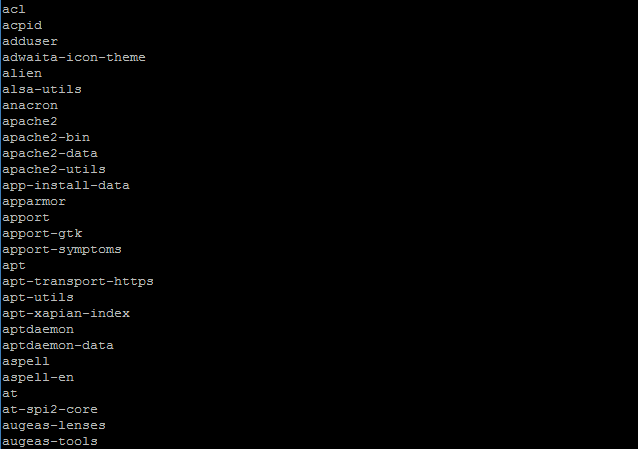
Результаты команды dpkg-query -f '${binary:Package}\n' -W

Чтобы получить список установленных пакетов, введите команду:

dpkg --get-selections | grep -v deinstall

Пример:
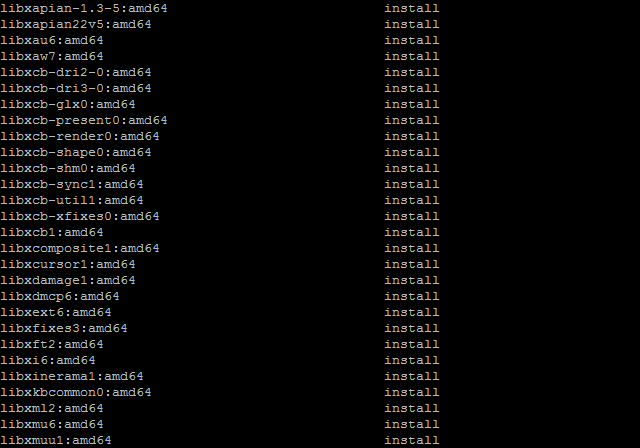
Результаты команды dpkg --get-selections | grep -v deinstall

Другой вариант:

apt list --installed

или можно просто найти все пакеты на основе PHP:

apt list --installed | grep php

Пример:
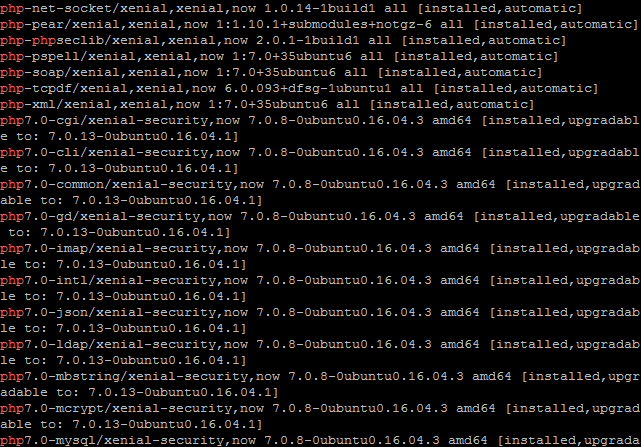
Результаты команды apt list --installed | grep php

Как сохранить список в текстовый файл

Команда выглядит следующим образом для server1:

dpkg --get-selections | grep -v deinstall > mylist.txt

Теперь скопируйте mylist.txt на server2 с вашим адресом, например 100.100.100.100:

scp mylist.txt 100.100.100.100:~/

Пример

The authenticity of host 100.100.100.100 (100.100.100.100)' can't be established.
ECDSA key fingerprint is SHA256:r+WgiifO
Are you sure you want to continue connecting (yes/no)? yes
Warning: Permanently added '100.100.100.100' (ECDSA) to the list of known hosts.

Как установить скопированные пакеты на server2

На втором сервере server2 для восстановления установок из mylist.txt, выполните следующую команду:

dpkg --clear-selections
sudo dpkg --set-selections < mylist.txt

или

sudo apt-get install -y $(< mylist.txt)

Наконец, выполните следующую команду, чтобы удалить ненужные пакеты:

sudo apt-get autoremove

Вышеприведенные команды должны восстановить пакеты из резервных копий или другого сервера.

Если данных на втором сервере нет, нужно их скопировать и после этого восстановить. Этот вариант заключается в использовании команды aptitude следующим образом:

### Создаем список программ в директории на первом сервере /tmp/packages.txt ###

dpkg --get-selections > /tmp/packages.txt

### Копируем файл на второй сервер с адресом 100.100.100.100 ###

scp /tmp/packages.txt 100.100.100.100:/tmp/

### Теперь вы можете установить пакеты на втором сервере используя команду apt-get/synaptic ###

1. Соединяемся с первым сервером

ssh root@100.100.100.101

2. Устанавливаем aptitude:

sudo aptitude

3. Восстанавливаем данные

aptitude install $(cat /tmp/packages.txt | awk '{print $1}')

Статья полезна?

45 Да  15 Нет
Похожие статьи
  • Как привязать домен к VPS: DNS, Cloudflare и BIND
  • Как настроить DNS-сервер на VPS
  • Как подключиться к Windows Server 2025 Core
  • Как настроить файловый сервер на Windows Server 2025 Core
  • Что такое Windows Server Core
  • Как подготовить «Большой диск» в Windows Server 2025 Core
Оставить комментарий Отменить ответ

Популярные статьи
  • Как подключиться по RDP из MacOS
  • Настройка VPN с использованием WireGuard
  • Как установить PostgreSQL и pgAdmin4 в Ubuntu 20.04
  • Как извлекать и разархивировать файлы .tar.gz в Linux-системах
  • Управление портами в Linux (Ubuntu/Debian/CentOS)
Разделы Справочника
  • Выделенные серверы
  • Настройка VPS Сервера
  • Начало работы
  • Особенности виртуального сервера
  • Партнерам
  • Развертывание ПО на VPS сервере
  • Сетевые настройки сервера
RUVDSSat1
ARCTIC DC
CLOUDRUSSIA
StratoSat-TK1
STRATONET
GAME OVERNIGHT
VPS/VDS серверы:
Тестовый период
Дешевый VPS
VPS Старт
VPS Мощные
VPS Windows
VPS Быстрые NVMe
VPS с 1C
Форекс VPS
Игровые серверы
VPS для бизнеса
Пинг до дата-центров
Bare Metal:
Bare Metal Старт
Bare Metal Стандарт
Bare Metal Мощные
Bare Metal AMD EPYC
Услуги:
Маркетплейс
Панель ispmanager
Антивирусная защита
Аренда лицензий
Облачное хранилище
VPS серверы с Plesk Obsidian
Колокация
Looking Glass
DNS
SSL сертификаты
Клиентам:
О компании
Дата-Центры
Новости
Аттестация по ФСТЭК
Серверы 152-ФЗ
Бонусная программа
Публичная Оферта
Условия использования ПО Microsoft
Соглашение об уровне услуг
Политика обработки персональных данных
Сувениры от RuVDS
Партнерам:
Для прессы
Партнерская программа
Отзывы
API
Помощь:
Справочник
FAQ
Созданных
серверов
1341243
Huawey
Supermicro
Cisco
Intel
Microsoft
ISP
Kaspersky
RDCA Logo

«Креатив года» Премия ЦОДы.рф 2021, 2025

RDCA Logo

«Хостер года» Премия ЦОДы.рф 2023

RDCA Logo

«Человек года» Премия ЦОДы.рф 2024

RuVDS
support@RUVDS.com
8 (800) 775-97-42
+7 (495) 135-10-99
МЫ В СОЦИАЛЬНЫХ СЕТЯХ
Copyright © 2025 RuVDS. Все права защищены.
ООО "МТ ФИНАНС" | ОГРН 1157746680332
RuVDS включён в
реестр Роскомнадзора провайдеров хостинга
Оставить отзыв

Условия получения бонуса за оставленный отзыв:

  1. Напишите про нас на любом из специализированных сайтах для отзывов.
  2. Пришлите нам текст отзыва и ссылку на ваш отзыв.
  3. После проверки, мы опубликуем ваш отзыв у нас на сайте и также начислим бонус на ваш баланс.
Strong Testimonials form submission spinner.

Обязательное поле

Укажите электронную почту вашего аккаунта RUVDS
Укажите ссылку на ваш отзыв
rating fields
Поставьте оценку серверам RUVDS
Оставить отзыв
Strong Testimonials form submission spinner.

Обязательное поле

Укажите электронную почту вашего аккаунта RUVDS
Укажите ссылку на ваш отзыв
rating fields
Поставьте оценку серверам RUVDS